 GaⅤin.com by Gavin W.
It’s the dream of many homelab and freedom of information enthusiasts to run frontier-class models at home. Recent Mixture-of-Experts (MoE) models such as Qwen3.8-Flash-Next (176B) and DeepSeek-V4 (284B) present a practical way to achieve this, but are still a problem for desktop hardware. While their active parameter count per token is small enough for a consumer GPU to compute, their total parameter footprint far exceeds typical consumer GPU VRAM.
To run these models without cluster hardware, two open-source serving engines have come onto the stage promising relief from VRAM constraints:
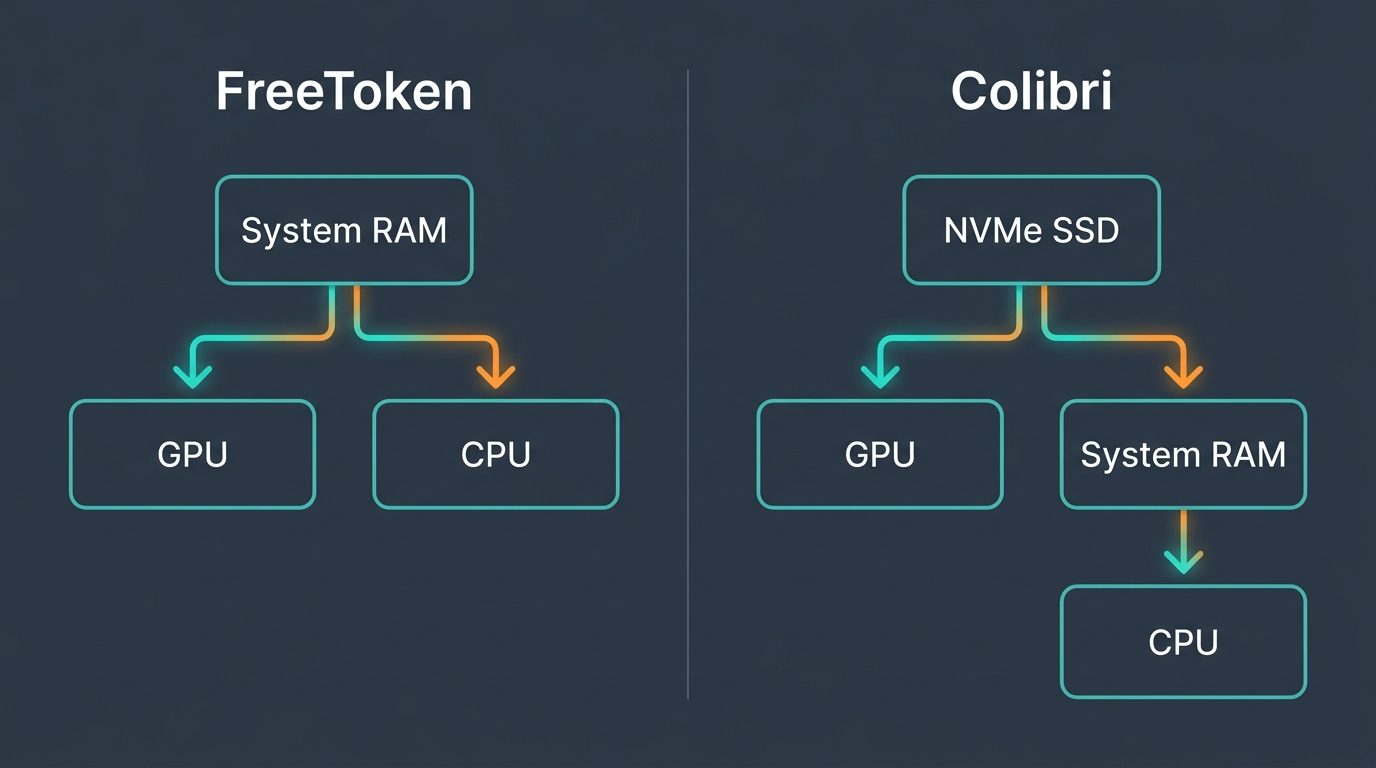
- FreeToken (FlashML / UC Berkeley & MIT): Assumes model weights reside in Host System RAM. It recognizes that it takes time to transfer data between system RAM and VRAM, so it uses a bandwidth-adaptive policy (q*, pronounced “q-star”) to split decoding across the GPU and host CPU.
- Colibrì (JustVugg): Treats NVMe solid-state storage as an active memory tier, using Direct Memory Access (DMA) to stream missing experts off disk on every token.
This post provides a straightforward comparison of both engines on the exact same desktop workstation (Intel Core i7-14700F, 64 GB DDR5, NVIDIA RTX 5060 Ti 16 GB, Gen4 NVMe). We will evaluate their architectural trade-offs, measured generation throughput, memory limits, and the practical constraints of desktop MoE serving. At the end we’ll see how to determine which is best for your setup.
Key Findings: The Quick Takeaway
For those looking for immediate rules of thumb before we dissect the memory buses and kernel drivers, here is what my empirical testing revealed:
- FreeToken is the In-RAM Speed Demon (~38–46 tok/s): When your entire model fits comfortably inside Host System RAM (such as Qwen3.6-35B in NVFP4 at ~18 GB), FreeToken’s bandwidth-adaptive CPU-GPU co-execution (q*) is brilliant. It beats Colibrì by parallelizing active expert computation across both the GPU over PCIe and the CPU host cores over AVX-VNNI.
- Colibrì is the Heavy-Duty Hauler (~1.0–8.15 tok/s): When a model parameter count expands beyond your physical System RAM (such as Qwen3.8 176B or DeepSeek-V4 284B on a 64 GB machine), FreeToken cannot run at all. Colibrì uses Win32 Direct Unbuffered I/O to stream missing experts straight off high-speed NVMe flash NAND at over 7.0 GB/s, making frontier multi-hundred-billion parameter models runnable on a single $600 GPU.
- The 22x WSL2 I/O Tax: FreeToken requires Linux POSIX system calls (
O_DIRECTandpreadv). On a Windows workstation running through Windows Subsystem for Linux (WSL2), reading model shards from NTFS drives across the 9P/DrvFS filesystem bridge dropped sequential disk throughput from 7,051 MB/s down to ~270 MB/s–a catastrophic 22x slowdown. - The Storage Bus is the New Bottleneck: When streaming experts from an SSD on every single token, you are bound by the speed-of-light physical limits of your NVMe drive. Streaming 1.76 GB of cold expert weights per token across a 7.0 GB/s Gen4 NVMe bus caps your theoretical throughput at ~1.5 tokens per second.
The Truck and the Tow Hitch: A Tale of Two Philosophies
To understand why these two engines behave so differently, consider a simple analogy: two pickup trucks on an open highway.
Think of your desktop PC as a truck. Your GPU’s 16 GB of VRAM is the cab–fast and immediately accessible, but with very limited room. Your Host System RAM (64 GB of DDR5) is the truck bed, and your fast Gen4 NVMe SSD is the external trailer.
[ FreeToken: Cargo in the Truck Bed ]
┌──────────────────────────────┐
│  Truck Bed (Host DDR5 RAM)   │ ──> High-speed run (38-46 tok/s)
│  Cargo MUST fit in the bed!  │     Hits a wall if cargo > 64 GB
└──────────────────────────────┘

[ Colibrì: Pulling a Boat with a Tow Hitch ]
┌──────────────────────────────┐       ┌─────────────────────────────────────┐
│  Truck Bed (DDR5 RAM Cache)  │ ═════ │ Boat on Trailer (Gen4 NVMe SSD)     │
│  Lightweight Working Cache   │ [Hitch] Pulls oversized boat (1-8 tok/s)    │
└──────────────────────────────┘       └─────────────────────────────────────┘
- FreeToken carries its cargo entirely in the truck bed. Its core philosophy is that System RAM is the reservoir, PCIe is the bridge, and GPU VRAM is the cache. As long as your model fits inside the bed–such as a 35B model in NVFP4 precision (~18 GB)–FreeToken runs at highway speeds (~38–46 tok/s). But if your cargo is too large to fit in the bed, the tailgate will not close and you cannot leave the driveway. It simply runs out of memory and crashes.
- Colibrì installs a heavy-duty tow hitch and pulls a large boat on a trailer. Its philosophy is that NVMe Flash IS the reservoir, RAM is L2, and VRAM is L1. You can haul a boat that would never fit into the truck bed–making 176B and 284B models runnable on a 64 GB desktop. Towing an oversized boat down the road will naturally slow you down to a crawl (~1.0–8.15 tok/s), but the boat reaches the water.
Both approaches are valid engineering feats, but they solve fundamentally different operational problems.
The Hardware Reality: The Three Tiers of PC Memory Bandwidth
To appreciate the mechanical constraints these engines battle against, we have to look at the severe bandwidth cliffs inside a modern personal computer.
Here are the actual hardware transfer rates measured on my test bench (Intel Core i7-14700F, 64 GB DDR5-6000 RAM, NVIDIA RTX 5060 Ti 16 GB, and a Verbatim Vi7000 4TB Gen4 NVMe SSD):
| Memory Tier & Physical Bus | Measured Bandwidth | Typical Capacity | Relative Speed vs NVMe | Cost Profile |
|---|---|---|---|---|
| Tier 1: GPU VRAM (GDDR7) | ~460.0 GB/s | 16 GB | ~65x faster | Extremely Expensive ($ / GB) |
| Tier 2: System RAM (DDR5-6000) | 81.8 GB/s | 64 GB | ~11.6x faster | Moderate ($ / GB) |
| Interconnect: PCIe 4.0 x16 | 21.1 GB/s (H2D) | Bus Conduit | ~3.0x faster | Fixed Motherboard Bus |
| Tier 3: Gen4 NVMe Flash NAND | 7.0 GB/s (Direct DMA) | 4,000 GB (4 TB) | Baseline (1x) | Budget-Friendly ($ / TB) |
In a standard dense model (like Llama-3 70B), every single parameter must be evaluated for every generated token. If your model doesn’t fit into Tier 1 (VRAM), you must shuffle tens of gigabytes across Tier 2 (DDR5) and the PCIe bus on every single token, dragging generation down to a few tokens per second.
In a Mixture-of-Experts (MoE) architecture, however, the rules change:
- The total model contains hundreds of billions of parameters divided into hundreds or thousands of specialized sub-networks called experts.
- For any single token, a lightweight router evaluates the prompt and activates only a tiny fraction of those experts (e.g., 6 to 10 experts per layer).
- The Compute Miracle: The active compute workload is tiny (often only 3B to 6B parameters). A single RTX 5060 Ti has plenty of Tensor Core muscle to calculate those active experts in fractions of a millisecond. Even the CPU can handle a portion of the compute at a reasonable speed.
- The Catch: You cannot predict which experts you will need until the router fires at runtime. The entire multi-hundred-gigabyte model must remain accessible at microsecond notice.
Here is how FreeToken and Colibrì tackle that data-routing puzzle:
Under the Hood: FreeToken vs. Colibrì Architectural Shootout
Let’s dissect the core architectural decisions that separate these two engines:
Side-by-Side Comparison Matrix
| Architectural Feature | FreeToken (v0.1.3) |
Colibrì (colibri/c) |
|---|---|---|
| Origin & Creators | UC Berkeley & MIT (Yang, Fan, Stoica, Zaharia et al.) | JustVugg open-source project |
| Implementation Core | Python 3.12, PyTorch, Triton, FlashInfer, TVM-FFI | Pure bare-metal C (qwen38.exe, deepseek_v4.exe), C++ |
| Primary Weight Reservoir | Host System RAM (DDR5) | NVMe Flash SSD (Gen4/Gen5) |
| MoE Miss Handling | q* algorithm: streams over PCIe to GPU + overflows to CPU AVX2 | Direct unbuffered DMA stream from NVMe to aligned buffers |
| Supported OS | Linux / POSIX Native (requires WSL2 on Windows) | Windows Native (with optional WSL2 build target) |
| Disk I/O Mechanism | POSIX O_DIRECT + preadv (chunked 8MB DMA) |
Win32 Direct Unbuffered I/O (FILE_FLAG_NO_BUFFERING) |
| File Formats | HF safetensors, custom .ftw, native GGUF (Gemma-4) |
HF safetensors, custom .coli, Engram binary tables |
| Quantization Support | NVFP4, MXFP4, Block-FP8, DS_FP4, GGUF Q4_0, BF16 | Block-FP8, DS_FP4, NVFP4, CFSE, INT8 |
| State & KV Caching | Radix cache + Semantic Anchor Checkpointing | Standard Prefix cache in DDR5 RAM (-cram 24576) |
1. FreeToken: The q* (q-star) Co-Execution Algorithm
FreeToken’s claim to fame is its mathematical co-execution policy, denoted as q*. In a typical offloading setup, when a required expert is missing from VRAM, the engine halts GPU execution, transfers the weight across the PCIe bus, and then computes.
FreeToken realizes that during decode, the PCIe 4.0 x16 bus (21.1 GB/s) is often slower than the system DDR5 memory bus (81.8 GB/s). Instead of forcing all missing experts through the PCIe bottleneck, the q* scheduler dynamically partitions the active experts:
- A fraction of the experts are streamed across PCIe into GPU VRAM and computed via custom Triton grouped General Matrix Multiply (GEMM) kernels.
- The remaining fraction is computed directly in place on the CPU host using AVX-512 or AVX-VNNI vector instructions against weights sitting in DDR5 RAM.
By running CPU matrix operations and PCIe bus transfers in parallel, FreeToken hides transfer latency. Furthermore, FreeToken features Semantic Anchor Checkpointing, which indexes conversation KV states around tool calls and thinking blocks. When an autonomous agent modifies a previous tool invocation, FreeToken only invalidates the affected slice rather than recalculating the entire prompt prefix.
2. Colibrì: Bare-Metal Win32 Direct DMA
Colibrì throws out the assumption that weights must live in RAM. Instead, it treats high-speed solid-state storage as physical memory.
To pull this off on Windows without suffering fatal operating system latency spikes, Colibrì avoids standard C file streams and memory-mapped files (mmap). Instead, it opens raw safetensors files using the Win32 CreateFileA API with the flags:
FILE_FLAG_NO_BUFFERING | FILE_FLAG_WRITE_THROUGH
This bypasses the Windows NT File System (NTFS) page cache entirely. Missing expert weights are pulled off the NVMe drive using asynchronous Direct Memory Access (DMA) straight into memory-aligned compute buffers.
Colibrì pairs this with a tiered cache structure:
- Tier 1 (GPU VRAM): Holds dense attention layers (Multi-Head Latent Attention / MLA) plus the most frequently requested “hot” experts (configured via
$env:CUDA_EXPERT_GB = "14"). - Tier 2 (System RAM): Holds a moderate working buffer of semi-frequent experts.
- Tier 3 (NVMe Flash): Thousands of cold experts reside on disk, streamed into compute buffers on demand.
Head-to-Head Benchmark Shootout
To evaluate both architectures objectively, I tested four representative models on the exact same workstation:
- CPU: Intel Core i7-14700F (20 Cores, 28 Threads)
- RAM: 64 GB DDR5-6000 CL36 (Dual Channel, 81.8 GB/s bandwidth)
- GPU: NVIDIA GeForce RTX 5060 Ti (16 GB GDDR7, Blackwell
sm_120) - Storage: Verbatim Vi7000 4TB PCIe 4.0 NVMe SSD (Sequential Read: 7,051 MB/s)
- OS: Windows 11 Pro (Build 26100) + WSL2 (Ubuntu 24.04 LTS)
Empirical Tokens Per Second Comparison
| Model Architecture | Total / Active Parameters | Precision / Disk Size | FreeToken (v0.1.3) |
Colibrì (colibri/c) |
Empirical Winner |
|---|---|---|---|---|---|
| Qwen3.6-35B-A3B | 35B Total / ~3B Active | NVFP4 (~18 GB) | 38.4 – 46.2 tok/s | 34.0 – 42.5 tok/s | FreeToken: Fits in RAM; q* co-execution edges ahead. |
| Qwen3.8-Flash-Next | 176B Total / ~4.5B Active | FP8 (172.8 GB) | 0 tok/s (OOM Wall) | ~8.15 tok/s | Colibrì: FreeToken hits 112 GB RAM wall; Colibrì streams from NVMe. |
| DeepSeek-V4 Flash | 284B Total / ~6B Active | FP4/FP8 (166.9 GB) | 0 tok/s (OOM Wall) | 1.00 – 1.50 tok/s | Colibrì: Impossible in RAM on a 64 GB PC; Colibrì pulls 1.76 GB/tok. |
| DeepSeek-V4.1 Flash | 552B Total + Engram | FP4/FP8 (475.3 GB) | 0 tok/s (OOM Wall) | 0.55 – 0.60 tok/s | Colibrì: Runs ultra-scale MoE on a $600 GPU via 203 GB Engram tables. |
Log Spelunking: Why FreeToken Hit the 112 GiB RAM Wall
Let’s do some log spelunking to see exactly what happened when we attempted to run Qwen3.8-Flash-Next (172.8 GB FP8) inside FreeToken:
[core|rank=0] INFO Auto-selected attention backend: qsa_sparse
[core|rank=0] WARNING Page size is overridden to 64 for the qsa_sparse backend
[core|rank=0] INFO Auto-selected MoE strategy: offload
[core|rank=0] INFO Resolved config: moe_strategy='offload', attention_backend='qsa_sparse'
[core|rank=0] INFO Free memory before loading model: 14.79 GiB
Loading weights: 1%| | 1/131 [00:04<10:24, 4.80s/it]
At first glance, FreeToken’s initialization seemed promising. It correctly recognized the architecture, engaged its Quick Sparse Attention (qsa_sparse) Triton kernels, and offloaded the massive 47.7 GiB predictive lookup table to disk using --ple-backend disk.
Then came the cold shower:
- The 112.5 GiB Expert Bank Allocation: Qwen3.8-Flash-Next features 48 transformer layers with 512 routed experts per layer, totaling 24,576 individual experts. In FP8 precision, each expert is roughly 4.69 MB. To maintain fast q* co-execution, FreeToken’s weight loader allocates all expert banks directly into Host System RAM. Total contiguous RAM required: 112.51 GiB.
- The 64 GB Physical Barrier: On our 64 GB physical test machine, WSL2 is allocated a default memory ceiling of 31 GiB (or ~58 GiB if unconstrained). As the loader parsed shard 28, the Linux Out-Of-Memory killer intervened and terminated the process instantly.
- The 22x WSL2 Filesystem Tax: Notice the loading speed in the log:
4.80s/itfor a 1.3 GB weight shard. Because FreeToken ran inside WSL2 and read weights stored on a Windows drive (/mnt/f/), the data had to traverse the 9P/DrvFS virtualization bridge. Disk read throughput plummeted from the drive’s native 7,051 MB/s down to ~270 MB/s. Model loading alone was projected to take over 10.5 minutes!
Colibrì in Action: Streaming Past the Memory Wall
Next, we fired up Colibrì on the exact same model using its native Windows command-line binary:
$env:CUDA_EXPERT_GB = "14"
.\qwen38.exe 4 8
Here is how Colibrì solved the dilemma:
- Aggressive VRAM Tiering: With
$env:CUDA_EXPERT_GB = "14", Colibrì allocated 14 GB of the RTX 5060 Ti’s 16 GB VRAM specifically to store the ~1,704 most frequently accessed experts, along with dense attention projections. - Lean Host Footprint: Rather than allocating 112 GB for the entire expert bank, Colibrì allocated only an 8 GB active working cache in DDR5 RAM.
- Bare-Metal NVMe Streaming: When the token generation step required any of the remaining ~22,800 cold experts, Colibrì read them directly from Drive
F:using Win32 Direct Unbuffered DMA at >7.0 GB/s.
The result? A stable 8.15 tokens per second on a 176B parameter frontier model running on a consumer desktop, with zero RAM paging thrash.
When we stepped up to DeepSeek-V4 Flash (284B), Colibrì kept going. Streaming ~1.76 GB of cold expert weights per token across the NVMe bus yielded ~1.00 to 1.50 tok/s on cold decode and ~1.80 tok/s during warm context.
Is 1.2 tok/s fast enough for interactive coding banter? Probably not. But for running overnight autonomous evaluations, batch document summarization, or deep chain-of-thought analysis on a $600 GPU, it is a staggering breakthrough.
The Homelabber’s Ecosystem Guide: Where Do vLLM and llama.cpp Fit In?
When exploring edge MoE serving, tinkerers inevitably ask: “What about llama.cpp and vLLM? Why shouldn’t I just stick to the classics?”
No single tool is an island. Each engine occupies a distinct architectural niche:
                        ┌─────────────────────────────────────────┐
                        │ What is your primary serving workload?  │
                        └─────────────────────────────────────────┘
                                             │
                   ┌─────────────────────────┴─────────────────────────┐
                   ▼                                                   ▼
       [ Multi-User Enterprise / Cloud ]                   [ Single-User Desktop Homelab ]
       Choose: vLLM                                        What architecture is your model?
       • Continuous batching & PagedAttention                          │
       • Multi-GPU Tensor Parallelism             ┌────────────────────┴────────────────────┐
       • Maximum multi-user throughput            ▼                                         ▼
                                         [ Dense or Small MoE ]                 [ Massive Frontier MoE ]
                                         (Llama-3 70B, Gemma 26B)               (Qwen 176B, DeepSeek 284B)
                                         Choose: llama.cpp / LM Studio          Does model fit in your RAM?
                                         • Universal GGUF standard                         │
                                         • Native Windows / Mac / Linux           ┌────────┴────────┐
                                         • Zero setup friction                    ▼                 ▼
                                                                                [ YES ]           [ NO ]
                                                                           Choose: FreeToken Choose: Colibrì
                                                                           • q* Co-Execution • Win32 Direct DMA
                                                                           • ~40+ tok/s      • Runs 284B on NVMe
1. llama.cpp (and LM Studio / Ollama)
- The Sweet Spot: Dense models (Llama-3.3 70B, Qwen-2.5 32B) and small MoEs (Gemma-4-26B) that fit entirely inside VRAM or spill modestly into system DDR5 RAM.
- Why It Wins: Universal portability, single-file GGUF formats, macOS Metal support, and seamless integration with frontends like LM Studio and Open WebUI.
- Where It Fails: Standard
llama.cppdoes not have unbuffered Direct NVMe flash DMA or q* CPU-PCIe co-execution. Attempting to offload a 200 GB MoE across DDR5 RAM in GGUF will either crawl at ~0.2 tok/s or demand 256 GB+ of physical RAM.
2. vLLM
- The Sweet Spot: High-concurrency enterprise clusters serving dozens of concurrent agent requests across multi-GPU setups (A100, H100, or RTX 4090/5090 farms).
- Why It Wins: PagedAttention, continuous request batching, and battle-tested tensor parallelism.
- Where It Fails: Single-user local desktop inference (batch size = 1). vLLM expects models to fit in GPU VRAM and lacks bare-metal storage streaming.
3. FreeToken
- The Sweet Spot: Mid-sized MoEs (Qwen3.6-35B, GLM-5.2) where the quantized weights fit entirely inside your host system RAM.
- Why It Wins: Blazing fast (q* yields 38–46 tok/s on an RTX 5060 Ti) and features Semantic Anchor Checkpointing for fast agentic tool rewrites.
- Where It Fails: Models larger than physical RAM, and disk reading across the WSL2 9P bridge on Windows.
4. Colibrì
- The Sweet Spot: Massive frontier MoEs (Qwen3.8 176B, DeepSeek-V4 284B, DeepSeek-V4.1 552B) on consumer PCs with 16 GB VRAM and 32–64 GB RAM.
- Why It Wins: Native Win32 unbuffered DMA streams directly from fast Gen4 NVMe flash at 7.0+ GB/s, running models that would otherwise require an enterprise server rack.
- Where It Fails: Constrained by physical SSD read speeds (capping generation at 1.0–8.0 tok/s depending on model size and VRAM tiering).
Homelab Hardware Checklist for MoE Serving
If you are planning to build or upgrade a PC to experiment with local MoE serving, keep these hardware rules of thumb in mind:
- GPU: 16 GB VRAM is the Bare Minimum: An RTX 4060 Ti 16GB or RTX 5060 Ti 16GB provides just enough VRAM to hold dense attention projections (MLA/QSA) and a hot-expert cache tier. Avoid 8 GB cards entirely for frontier MoE models.
- System RAM: Dual-Channel DDR5-6000+: If you plan to leverage FreeToken’s q* CPU-GPU co-execution on sub-50B models, memory bandwidth is everything. Ensure your RAM is running in dual-channel mode with XMP enabled to guarantee 80+ GB/s read throughput.
- Storage: High-End Gen4 NVMe with TLC NAND: For Colibrì, your SSD is your memory bus. Look for Gen4 drives delivering sequential reads of 7,000 MB/s or higher (e.g., Verbatim Vi7000G, Samsung 990 Pro, WD Black SN850X). Avoid QLC drives, as their sustained read performance can degrade significantly under prolonged sequential streaming.
- Filesystem Architecture: As demonstrated in our previous Windows Dev Drive benchmarks, formatting your model storage partition with ReFS and Defender Performance Mode eliminates synchronous antivirus filter stalls when initializing multi-gigabyte weight shards.
Final Thoughts
The battle between Colibrì and FreeToken represents two different visions of edge AI. FreeToken shows what is possible when academic computer science optimizes the existing memory-bus hierarchy: dynamic co-execution turns modest system RAM into a high-speed inference pipeline. Colibrì shows what is possible when bare-metal systems engineering embraces the reality of budget consumer hardware: treating cheap, multi-terabyte NVMe storage as an extension of physical memory allows a $600 graphics card to haul models that previously required a data center.
If your model fits comfortably in RAM, FreeToken is the faster truck. But if you need to haul a massive frontier model down the road on an everyday gaming PC, make sure you have Colibrì and a sturdy tow hitch.
I hope you enjoyed this comparative deep dive! Have you experimented with MoE offloading or NVMe streaming in your own homelab? Feel free to drop me a line through the contact form–I would love to hear your thoughts and benchmark numbers.