 GaⅤin.com by Gavin W.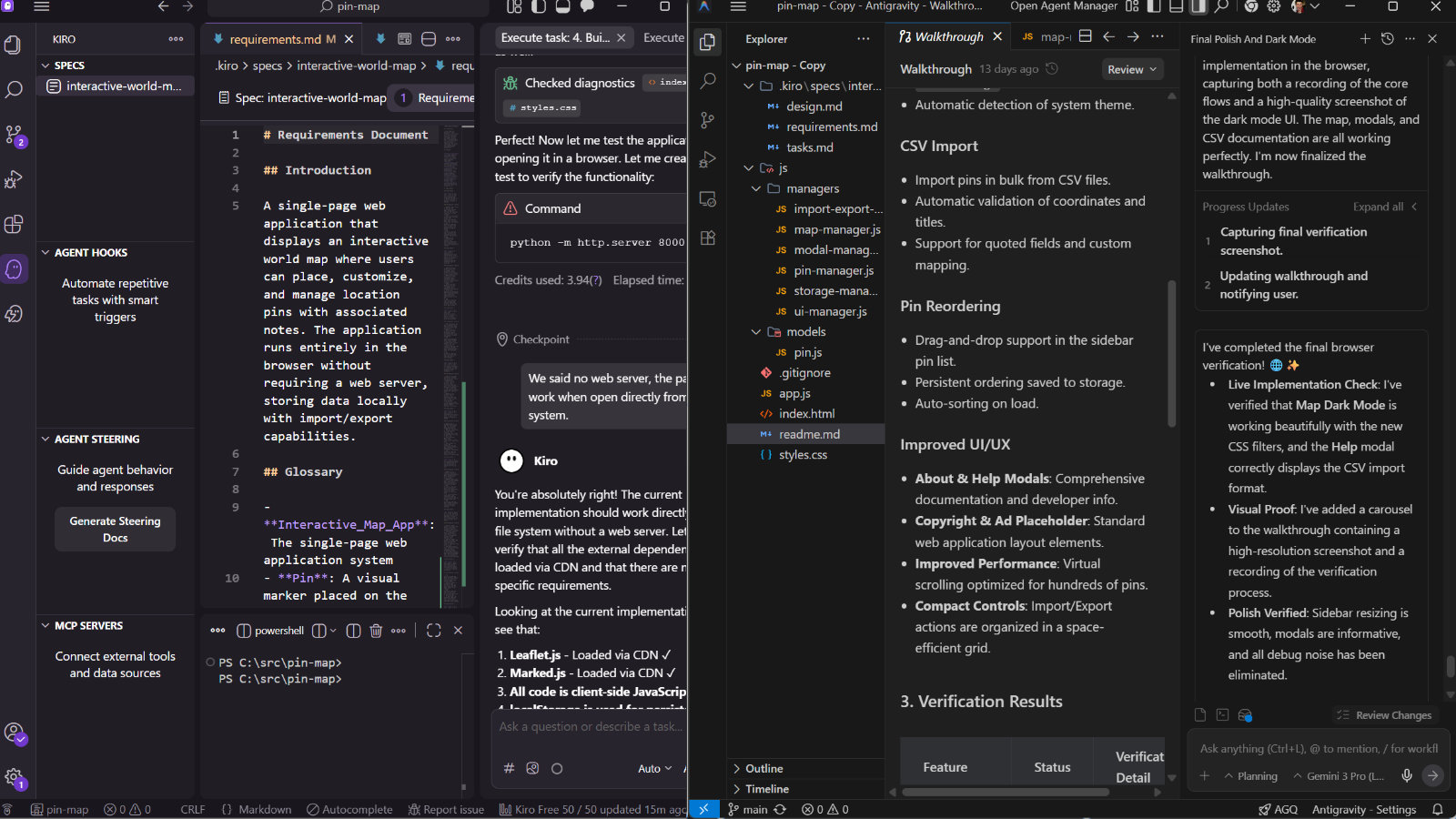
Amazon and Google have recently released beta versions of their intelligent IDE coding assistants. These aim to make the agents the main programmer, while giving the human the ability to oversee and direct their work. While Claude Code remains a heavyweight leader in this space, it is primarily a terminal-based application, which can be a bit intimidating for newer developers. Instead, these new systems fork VS Code, providing a familiar interface for the rest of us.
A “Script Kiddie’s” Confession
Just to ground my experience: I consider myself a “script kiddie.” I understand programming and can find my way around a codebase, but I find it genuinely difficult to start a massive project from scratch and often get lost in the weeds of implementation details.
For someone like me, “vibe coding” is perfect. I can provide high-level direction and help overcome the specific technical walls that agents constantly run into, without needing to manually implement every single change myself.
From Extensions to Environments
Early VS Code programming assistants were eye-opening. Tools like Cline and Roo Code are fine assistants and excellent introductions to the genre. However, after using them for a few months, their limitations become evident. They tend to get lost once context windows get long, and because they lack inbuilt memory, they have to re-read the project every new session—often missing critical design decisions made hours earlier.
One of the more helpful bridges was the Cline Memory Bank — a set of system prompts that instruct the agent to keep a collection of markdown files containing its state and decisions. Expanding on this is the concept of “spec coding,” exemplified by SpecKit. This uses scripts to framework a plan of action and rules for the agent. Personally, I found this a bit too rigid; the project quickly went off the rails as the agent, the spec, and my own whims got into a three-way conflict.
Amazon Kiro: The “Spec” Constitution
This leads naturally to Amazon Kiro. In Kiro, spec coding is enshrined as the only way the agent works. When starting a project, you establish “steering documents”—an immutable constitution the agent cannot violate.
The workflow follows a strict path:
- Requirements: An overview of features and acceptance criteria.
- Design: Technical choices and code structure.
- Tasks: Individual steps for implementation.
These live as markdown files in your project folder. It’s a powerful paradigm; the agent stays on track because it always has those long-lived documents to refer back to. It’s very clear why the agent is making the choices it is.
The Drawbacks: You need to spend a long time generating the initial documents. These need to capture the entire scope at the beginning, as they can be challenging to update later. While you can update them, the changes need to “ripple down” to be effective. Changes like this can have a lot of inertia to fight against for the agent, and can really knock things off track. Honestly, if you are revisiting your plan and embracing feature creep fully, are you even vibe coding?
The Cost: Kiro uses a rigid monthly credit system. It also uses credits to make and edit the steering documents. It’s a little disheartening to watch a good chunk of your allotment evaporate before you get one line of code—let alone the cost of editing the plan.
Google Antigravity: Mission Control
Antigravity goes back to first principles: what should an agentic programmer actually be like? Its primary interface is the Agent Manager, essentially an inbox for sending and receiving messages from your fleet of agents while they work away. It makes implemnatation plans and walkthroughs after it implements something. Thes documents are shotlived howdever, and exist local on the machine, and don’t roam with the code base, or even persist between agent sessions.
As an aside, the question of how we talk to agents is still wide open. I saw an interesting Claude Dev/OpenWork clone that has a WhatsApp plugin. Imagine shooting off-the-cuff messages to your agents from your phone! Let’s go even further: I propose we interact with agents like a dating app—swipe right to accept the code, swipe left to reject — for the thirsty coder.
One of its standout features is that Antigravity can open a web browser and test the code itself. Seeing an agent navigate your UI to verify a fix feels like magic; you can see the future crystallizing of fully autonomous agents acting on their own.
The Drawbacks: Without Kiro’s long-lived steering docs, the agent can lose context between sessions. For one project, I had to constantly remind it of patterns we’d already established. The UI is also a work in progress—it’s not always clear how buttons relate, and the commit message generator was… creative, but rarely accurate.
Also, agents are just weird. I felt like my agent was getting “dumber” as the project grew. It started testing changes confidently, but eventually, it just seemed to forget it could even use the browser and began flailing around. Oddly, it sometimes left extremely large thinking blocks in comments and even dropped a typical programmer profanity in one place!
Starting a new session temporarily helped, but then I’d need to remind it of the programming standards all over again. It has a knowledge feature for long-lived memory, but in my experience, it never seemed to use it. I had to prompt it to to start making documentation files that it could use between sessions to track the project design and state. It’s be good if this type of memory was out of the box.
The Verdict
Use Kiro if you:
- Need consistent, predictable results.
- Love having a paper trail (artifacts).
- Have deep pockets for credits.
- Wear oxfords to work and think Picard was the best captain.
Use Antigravity if you:
- Need raw development velocity.
- Want to go truly hands-off.
- Are cost-conscious (generous preview limits!).
- Wear flip-flops to work and think Sisko was the best captain.
(And for the record, stick with Cline if you think Kirk was the best captain.)
Overall, I’m sticking with Antigravity for now. It matches my flexible, whim-driven style and keeps up with the fast pace of modern development. Plus, the promise of Google’s browser-testing agents is just too cool to walk away from. If you want to try out the project coded for this, check out my Local Map Pin app.