 GaⅤin.com by Gavin W.
I’m jumping on the Clawbot (Clawd/Moltbot) bandwagon. I wanted to run it local as much as possible, and the documentation is there, but it’s hard to parse, and parts can be confusing. So here’s my notes on how I got it working.
Initial Setup
My main box is a Windows 11 machine with an RTX 5060 16 GB VRAM. I already have LM Studio running, to host my local LLMs. It’s nice and easy and lets you change out models on the fly, while giving a simple view of what’s going on. I decided to run Clawbot inside a VM hosted on this machine. So I spun up a quick Pop!_OS VM, and did the basic needful. Follow the oneliner to install, and you can look at the basic interface. I put the VM on a shared network so it got its own IP on my local network, just to make the routing easier.
Logging into the UI
The entire config is stored by default in home/.clawdbot/clawdbot.json. You can directly edit this file to change or view the settings.
The documentation isn’t very clear on this, but you can access the UI via a browser. It may generate a security token for you to authenticate with, if you don’t know it, look in the config file. Go to the web UI on the machine that Claw is installed on - usually at http://localhost:18789. Under control > Gateway access, paste the token into the “Gateway Token” field and hit connect. This should hopefully give you a green light and a connection status of “Connected”.
Local LLMs
I’m using LM Studio to host my LLMs. I’ve got a few running, but the one I’m using for Clawbot is Qwen 3 4b Thinking. It’s not too big for my 16 GB of VRAM and has decent reasoning capabilities. I’ve got LM Studio running on port 1234, which is the default for LM Studio.
The documentation explains how to use LM Studio, but it’s a bit sparse. Change the Base URL to wherever you are serving the model from, this will be in the Developer > Local Server tab in LM Studio. I then had to change the Agents Primary to lmstudio/qwen/qwen3-4b-thinking-2507. Then update the Models id and name. I’m also getting decent results with Ministral 3 14B, and if I really push my system it can run Zai GLM 4.7 Flash, but pretty slow with CPU offloading.
Fixing the LM Studio Prompt Truncation Error (n_keep >= n_ctx)
I was getting a dumb error “Cannot truncate prompt with n_keep (11543) >= n_ctx (4096). Error Data: n/a, Additional Data: n/a”. It turns out that it wasn’t loading the model that I had configured with the larger context window, but the default too small one. So I had to change the model settings in the LM Studio UI, and reload it.
Local Network & Cloudflare
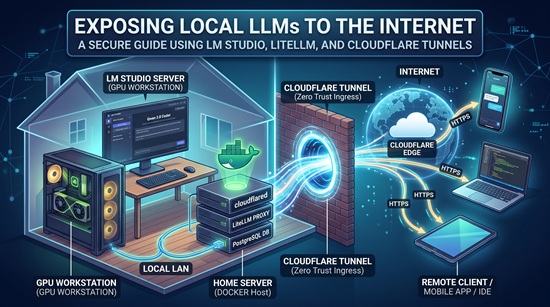
I didn’t want to plug it into any of the remote access tools like Tailscale or ZeroTier, so I decided to use Cloudflare Tunnels to access the web UI. A few small things got in the way to even serve it over the local network. First it doesn’t serve on the lan by default, this can be turned on in the settings under Config > Gateway > Bind, and change it to lan.
Resolving Gateway Disconnected: Insecure Control UI Auth
To get HTTPS working, you need to enable it in the settings under Config > Gateway > TLS. Then you need to reconnect and reauth at https://localhost:18789. You can also get to the web UI from your network at that address, but still it wasn’t letting me connect. The final secret is Gateway > Control UI > Allow Insecure Control UI Auth. Even though it’s HTTPS, it still doesn’t let you connect without this.
At this point I was ready to set up Cloudflare tunnels to access from the web. If you have used Cloudflare Tunnels before, you know it’s pretty straightforward. You install the cloudflared daemon, and then run cloudflared tunnel --url https://localhost:18789 or set it up in the Cloudflare dashboard. Technically, you could have done this without serving on the lan, but you still need the insecure auth enabled. It’s also a good idea to use their ZeroTrust Access controls to put another layer of authentication in front of the web UI.
Final Settings File
Here’s the final file I ended up with. It should help you get started with Clawbot. Most of these have the configs without the full context, so I hope this helps get you started!
{
  "meta": {
    "lastTouchedVersion": "2026.1.24-3",
    "lastTouchedAt": "2026-02-02T22:03:36.242Z"
  },
  "wizard": {
    "lastRunAt": "2026-01-29T02:08:35.432Z",
    "lastRunVersion": "2026.1.24-3",
    "lastRunCommand": "onboard",
    "lastRunMode": "local"
  },
  "models": {
    "providers": {
      "lmstudio": {
        "baseUrl": "http://192.168.0.10:1234/v1",
        "apiKey": "LMSTUDIO_KEY",
        "api": "openai-completions",
        "models": [
          {
            "id": "qwen/qwen3-4b-thinking-2507",
            "name": "Qwen 3",
            "reasoning": false,
            "input": [
              "text"
            ],
            "cost": {
              "input": 0,
              "output": 0,
              "cacheRead": 0,
              "cacheWrite": 0
            },
            "contextWindow": 55000,
            "maxTokens": 8192
          }
        ]
      }
    }
  },
  "agents": {
    "defaults": {
      "model": {
        "primary": "lmstudio/qwen/qwen3-4b-thinking-2507"
      },
      "models": {
        "lmstudio/minimax-m2.1-gs32": {
          "alias": "Minimax"
        }
      },
      "maxConcurrent": 4,
      "subagents": {
        "maxConcurrent": 8
      }
    }
  },
  "tools": {
    "web": {
      "search": {
        "apiKey": "blahblahblah"
      }
    }
  },
  "messages": {
    "ackReactionScope": "group-mentions"
  },
  "commands": {
    "native": "auto",
    "nativeSkills": "auto"
  },
  "gateway": {
    "port": 18789,
    "mode": "local",
    "bind": "lan",
    "controlUi": {
      "allowInsecureAuth": true
    },
    "auth": {
      "mode": "token",
      "token": "blahblahblah"
    },
    "tailscale": {
      "mode": "off",
      "resetOnExit": false
    },
    "tls": {
      "enabled": true,
      "autoGenerate": true
    }
  },
  "plugins": {
    "entries": {
      "qwen-portal-auth": {
        "enabled": true
      }
    }
  }
}